What Is a DNS Leak and Why Does It Matter?
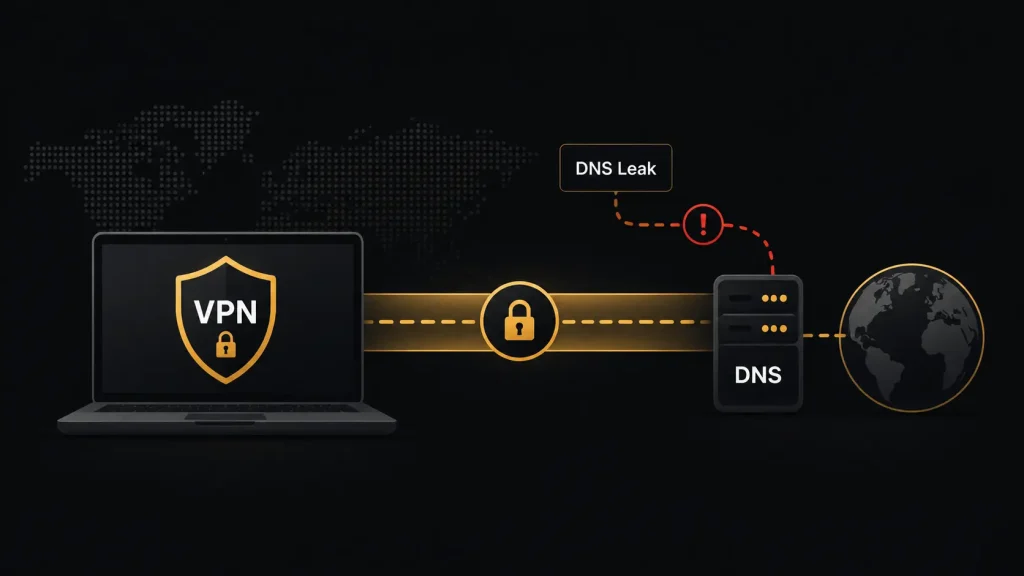
You connect to a VPN before using public Wi-Fi or opening a streaming service, expecting your activity to go through the encrypted VPN connection. Sometimes DNS requests can bypass that connection and reach your internet provider directly. This is known as a DNS leak, and it can reduce the privacy benefits of a VPN.
What Is a DNS Leak?
DNS stands for Domain Name System. It translates website names such as example.com into IP addresses that computers use to find the correct servers.
Normally, your internet provider handles these DNS requests. When you connect to a properly configured VPN, DNS traffic should travel through the VPN tunnel and use DNS servers selected by the VPN service.
A DNS leak happens when requests go outside that encrypted tunnel. Your ISP or another DNS provider may then see which domains your device is trying to access.
Your web traffic may still travel through the VPN, but exposed DNS requests can reveal part of your browsing activity.
Why DNS Leaks Matter
Many people use VPNs to prevent their internet provider from easily seeing which websites they access. If DNS requests continue going to the ISP, that privacy benefit becomes weaker.
A DNS leak can also cause problems when accessing services from another region. A website may compare your VPN IP address with information from your DNS connection. If they point to different locations, the service may detect the VPN or have trouble identifying your location.
A DNS leak does not reveal everything you do online. HTTPS still encrypts the content exchanged with most modern websites. DNS requests generally reveal domains rather than individual pages or the information you send.
What Causes a DNS Leak?
DNS leaks can occur when your operating system continues using DNS settings provided by your network instead of the VPN.
Changing between home Wi-Fi, public Wi-Fi and mobile data can also affect network settings. Some devices or applications may use their own DNS configuration.
IPv6 can create another issue if a VPN handles IPv4 traffic but does not properly route IPv6 connections. A VPN connection that suddenly drops may expose DNS requests too.
How to Check for a DNS Leak
You can use a DNS leak test while your VPN is connected. These tests show which DNS servers receive requests from your device.
Connect to your VPN, choose a server and run the test. Seeing your regular ISP among the results can indicate a leak. DNS servers associated with the VPN or its infrastructure are generally expected, although results depend on how the service handles DNS.
Consider repeating the test after changing VPN servers or switching between Wi-Fi and mobile networks.
How to Prevent DNS Leaks
Start by checking whether your VPN includes DNS leak protection and make sure it is enabled.
A kill switch is also useful because it can block internet traffic if the VPN unexpectedly disconnects. This reduces the chance of your device returning to an unprotected connection.
Keep your VPN app and operating system updated. Avoid manually changing DNS settings unless you understand how they interact with the VPN.
It is also worth testing your connection occasionally, especially after changing VPN apps, devices or network settings.
Should You Worry About DNS Leaks?
A DNS leak does not expose everything you do online, but it weakens an important layer of VPN privacy. If you use a VPN to keep browsing activity away from your ISP, DNS leak protection should be part of your setup.
A reliable VPN should route both internet traffic and DNS requests through the protected connection. A quick DNS leak test can help confirm whether that is happening.